 COSM-GAME
 How to Get Unstuck with Force Relocation in Echoes of Aincrad
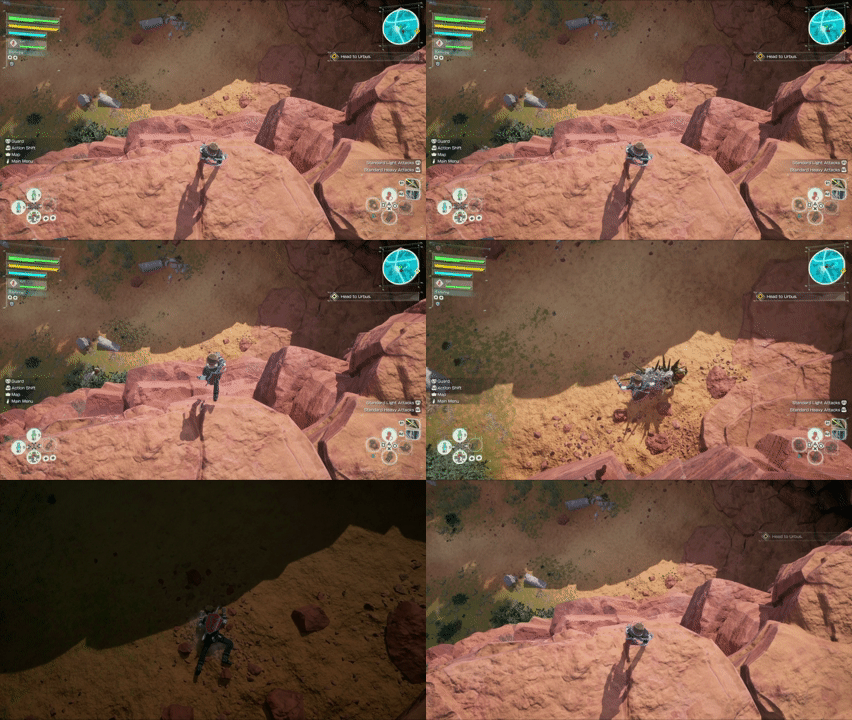
Echoes of Aincrad includes Force Relocation as an official recovery option when your character becomes stuck in terrain. Open the main menu, go to Settings > Gameplay Settings > Force Relocation, and the game will move your character to a safe location.
Guide facts
On this page
Use Force Relocation when your character is stuck in terrain
Echoes of Aincrad includes an official recovery option for situations where your character becomes trapped in terrain and normal movement no longer gets you out.
Bandai Namco specifically warns that trying to explore areas through extreme heights or deep-water terrain in ways the game does not normally intend can result in unexpected behavior.
If that leaves your character unable to escape, use Force Relocation instead of repeatedly trying to climb, jump, or move farther into the unintended terrain.
Note: Force Relocation is a recovery function. It is not a shortcut for entering quest areas that have not been unlocked yet.
Open Force Relocation through Gameplay Settings
Settings.Gameplay Settings.Force Relocation.The complete official menu path is Settings > Gameplay Settings > Force Relocation.
You can verify the recovery route in Bandai Namco's official A Guide to Aincrad.
Force Relocation moves you to a safe location
After selecting Force Relocation, the game moves the character to a safe location. You can then resume normal exploration instead of remaining trapped in the terrain.
Bandai Namco does not describe Force Relocation as ordinary fast travel. Its documented purpose is specifically to recover a character that has become stuck.
Do not use Force Relocation just to reach a normal checkpoint
If you are not stuck and simply want to return to a previously visited location during a field quest, use Return to Checkpoint from the map menu instead.
Bandai Namco says Return to Checkpoint can send you back to a Safety Area or another previously visited location.
Note: Return to Checkpoint cannot be used during dungeon quests. Use Return to Town when you need supplies or equipment changes
There is another separate option when you want to leave the current quest area without using Force Relocation.
Transfer.Return to Town.Bandai Namco says this suspends the current quest while keeping the items and Col collected up to that point. It is useful when you need supplies, equipment changes, or additional preparation.
An unreachable location may simply require more quest progress
Echoes of Aincrad uses a quest-based progression structure. New regions and locations become available as you explore, complete quests, and advance the story.
If an area appears impossible to enter normally, do not assume you need to force a route across very high terrain or deep water. That location may not be available during the current quest.
Use intended routes, activate Safety Areas and Warp Terminals as you discover them, and reserve Force Relocation for situations where the character has actually become stuck.
If Force Relocation does not solve the problem
- Confirm that you opened
Settings > Gameplay Settings > Force Relocationrather than one of the normal map travel options. - If you are not physically stuck, try
Return to Checkpointfrom the map menu instead. - If you can reach a Safety Area or Warp Terminal and want to leave the quest, use
Transfer > Return to Town. - Install the latest available Echoes of Aincrad update before troubleshooting persistent game behavior.
Bandai Namco's official update information recommends applying the latest update before continuing the adventure.
Trailer, screenshots, and media
FAQ
7 questionsOpen the main menu and go to Settings > Gameplay Settings > Force Relocation.
Bandai Namco says Force Relocation moves a character that is stuck in terrain to a safe location.
Use it when terrain prevents normal movement, particularly after entering unintended areas around extreme heights or deep-water terrain.
No. Echoes of Aincrad unlocks new areas as quests and exploration progress. Force Relocation is a recovery option for stuck terrain, not a way to bypass area progression.
Use Return to Checkpoint when you simply want to fast travel back to a Safety Area or another previously visited checkpoint during a field quest. Use Force Relocation when the character is physically stuck.
No. Bandai Namco states that Return to Checkpoint cannot be used during dungeon quests.
Yes. At a Safety Area or Warp Terminal, select Transfer and then Return to Town. Bandai Namco says items and Col collected up to that point are retained.