 COSM-GAME
 How to Set Up Crimson Desert Cross-Save Across Platforms
Crimson Desert supports Cross-Save between PlayStation, Xbox, Steam, and Epic Games through a Pearl Abyss ID. You must link the platform accounts you want to use, upload progress manually to the shared Cross-Save slot, and keep each platform updated before loading newer save data.
Guide facts
On this page
Cross-Save currently supports PlayStation, Xbox, Steam and Epic Games
Crimson Desert Cross-Save uses a Pearl Abyss ID to connect supported platform accounts to one shared save slot.
The official Cross-Save page currently supports:
- PlayStation Network
- XBOX
- Steam
- Epic Games
Mac is not currently supported by Cross-Save. This is separate from Crimson Desert itself being available on Mac.
You also need an internet connection. Account linking and Cross-Save uploads or downloads are unavailable in Offline Mode.
Note: You must own Crimson Desert separately on every platform where you want to play. Cross-Save shares progress, not game ownership.
Update every platform before moving a save
Install the latest Crimson Desert update on every platform you plan to use.
Pearl Abyss says an older save can load after the game is updated, but a save created on a newer version cannot load on a platform that is still running an older version.
Updating first reduces the risk of reaching the other platform and finding that the shared save cannot be opened.
Set up Cross-Save from the Save Game menu
Save Game.Cross-Save Settings.Refresh.Cross-Save slot.Link every platform to the same Pearl Abyss ID
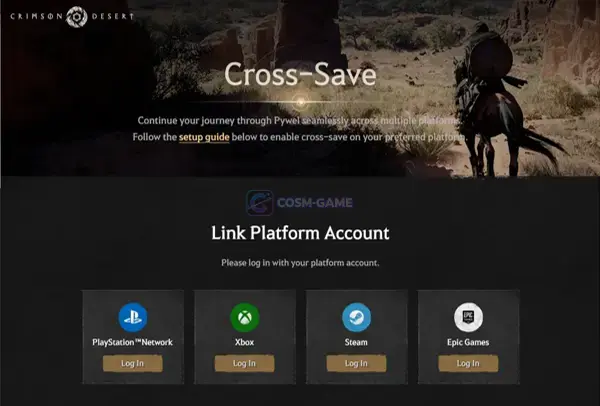
The Cross-Save webpage lets you connect one account from each supported platform. You can have up to four linked platform accounts in total:
- One PlayStation Network account
- One XBOX account
- One Steam account
- One Epic Games account
A platform account can only be linked to one Pearl Abyss ID at a time. If an account is already connected to a different Pearl Abyss ID, you must sign in to the currently linked Pearl Abyss ID and unlink that platform account before connecting it elsewhere.
Cross-Save uses one shared slot and does not sync automatically
Every Pearl Abyss ID receives one Cross-Save slot. The same slot is shared by every supported platform connected to that account.
The slot does not continuously update in the background. Before changing platforms:
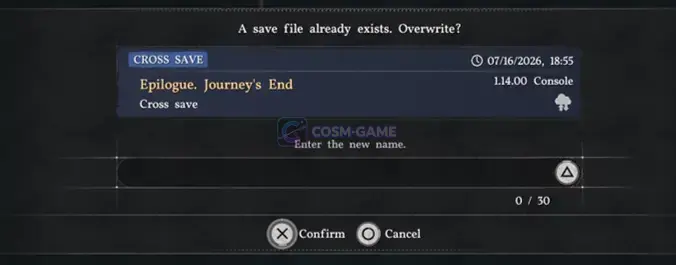
Save Game.Cross-Save slot.If you leave the first platform without updating the Cross-Save slot, your newest local progress will not automatically appear on the other platform.
Platform purchases do not all transfer with the save
When you load the shared save on another platform, your character progress and inventory carry over.
Platform-specific paid items or entitlements are different. Pearl Abyss says an entitlement bought on one platform may not appear or may remain unavailable on another platform where that entitlement was not purchased.
You can still load and play the Cross-Save file, but a disabled paid item may need to be purchased separately on that platform before you can use it there.
Do not unlink your last account before protecting the save
You can unlink connected platform accounts from the official Cross-Save page.
If two or more platform accounts remain linked, removing one does not delete the shared Cross-Save data. However, unlinking the last remaining platform account permanently deletes the Cross-Save slot data.
Before removing the final platform account, load the Cross-Save data and store the progress in a normal local save slot.
Deleting the Pearl Abyss ID itself also permanently deletes the Cross-Save data associated with it.
If the Cross-Save file does not appear
Pearl Abyss recommends checking these specific points:
Cross-Save slot.For additional save protection, Pearl Abyss also recommends keeping local backups where available. The official Crimson Desert Save Data Notice explains local PC and Mac save locations and warns about cloud synchronization conflicts.
Trailer, screenshots, and media
FAQ
8 questionsPearl Abyss currently supports Cross-Save between PlayStation, XBOX, Steam, and Epic Games. The official Cross-Save page states that Mac is not currently supported.
No. Pearl Abyss says the Cross-Save slot must be updated manually. Save your latest progress to the Cross-Save slot before leaving one platform if you want that progress available on another.
You can link one PlayStation Network account, one XBOX account, one Steam account, and one Epic Games account to the same Pearl Abyss ID, for a maximum of four linked platform accounts.
Each Pearl Abyss ID has one shared Cross-Save slot. Every linked supported platform uses that same slot.
Yes. Pearl Abyss states that you must own Crimson Desert separately on every platform where you want to play, even when those platforms share progress through Cross-Save.
Character progress and inventory carry with the Cross-Save data, but platform-specific paid entitlements may be unavailable on a platform where you did not purchase them.
Unlinking the final platform account permanently deletes the save stored in the Cross-Save cloud slot. Pearl Abyss tells players to save the data to a local slot before unlinking the last account.
Check that the platform account is linked to the correct Pearl Abyss ID, the save was actually uploaded to the Cross-Save slot, the device is online, and the destination platform is updated. A save made on a newer game version cannot load on an older game version.