 COSM-GAME
 How to Transfer a Road to Glory Player to Madden NFL 27
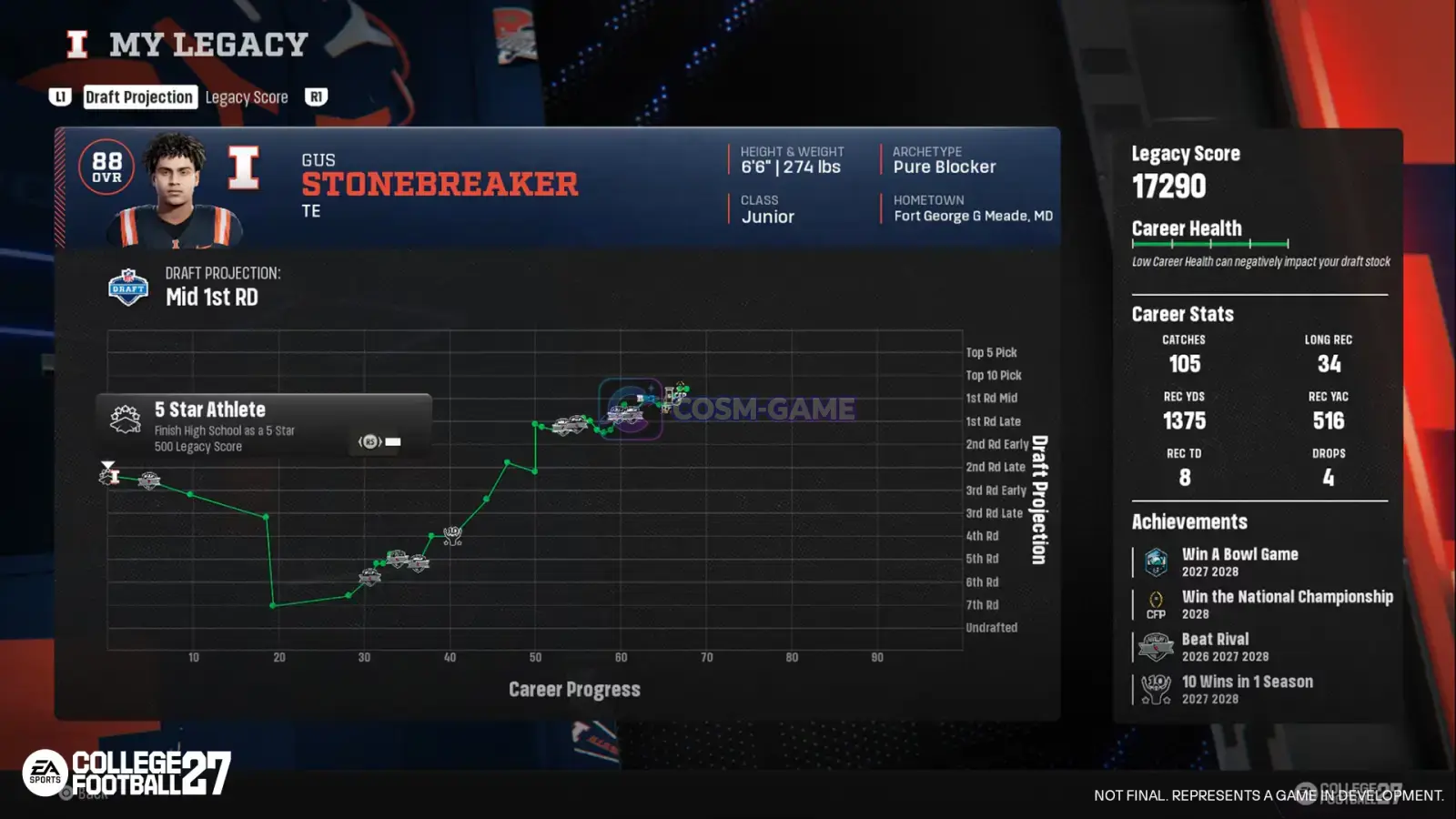
EA SPORTS College Football 27 lets you continue an eligible Road to Glory career in Madden NFL 27 Superstar. Finish and save the college career, export the player through Leave for the NFL, then import the matching position in Madden while both games use the same EA Account.
Guide facts
On this page
Finish and save your Road to Glory career first
You cannot send an unfinished Road to Glory player directly into Madden NFL 27. EA requires the player to be eligible for the NFL Draft, and your completed college career must be saved before the transfer.
Before exporting, make sure:
- Your Road to Glory career is completed.
- Your final season progress is saved.
- The player is eligible for the NFL Draft.
- College Football 27 and Madden NFL 27 are signed into the same EA Account.
- Your system is connected to the internet so the transfer can sync.
- Both games are fully updated.
Note: EA allows only one import per Madden NFL save file. Finish the college career you want to use before importing it into that Superstar save.
Export the player from College Football 27
Road to Glory.Actions tab.Leave for the NFL.Export Player to Madden.If Leave for the NFL or the Madden export option is not available, the player may not yet meet the NFL Draft eligibility requirement.
Import the player into Madden NFL 27 Superstar
After College Football 27 confirms the export, leave the game and open Madden NFL 27 with the same EA Account.
Superstar.Import.Import College Career, select that option to continue with the transferred Road to Glory data.EA supports the Road to Glory player import on PC, PlayStation 5, and Xbox Series X/S.
Your college career affects the Madden Superstar
The transfer does more than recreate the player's appearance. EA says key information from the Road to Glory career carries into Madden NFL 27 Superstar.
The transferred information includes:
- Position
- Overall player rating
- Career achievements, including accomplishments such as Heisman wins or championship appearances
- College
- Hometown
Madden NFL 27 also references more of what your player accomplished during college, and EA says your Road to Glory Draft Score directly influences your NFL draft position.
Your college OVR can give you Creation Points
After importing, Madden NFL 27 lets you continue customizing the player before starting the professional career.
EA says imported Road to Glory players can receive up to 5 Creation Points based on their college OVR. A higher college OVR can result in more Creation Points.
You must spend all of the available Creation Points before continuing through the Superstar setup. Use them to improve the skills you want before the NFL Combine and draft process begins.
The import can only be used once per Madden save file
EA specifically limits the college career import to one time per Madden NFL save file.
This does not mean that your College Football 27 Road to Glory file disappears. It means the Madden Superstar save you are creating only gets one college career import, so choose the completed career you actually want to continue.
If your exported Road to Glory player does not appear
- Confirm that College Football 27 showed a successful export message.
- Confirm that both games are using the same EA Account.
- Check that the system is connected to the internet.
- Make sure both games have their latest updates installed.
- In Madden NFL 27, choose the position that matches the exported Road to Glory player before selecting
Import. - Confirm that the Road to Glory career was completed and the final season was saved.
If the player still does not appear, use EA's official College Football 27 transfer guide or the official Madden NFL 27 transfer guide and continue through the EA support flow for the affected account.
Trailer, screenshots, and media
FAQ
11 questionsEA requires the Road to Glory player to be eligible for the NFL Draft. Complete the career and save the final season before exporting.
Open Road to Glory, go to the Actions tab, select Leave for the NFL, then select Export Player to Madden.
Open Superstar from the Madden NFL 27 main menu, choose the position matching the exported Road to Glory player, then select Import. EA also refers to this option as Import College Career during Superstar setup.
Yes. EA specifically requires both games to use the same EA Account for the Road to Glory transfer.
Yes. EA requires an internet connection so the exported data can sync between College Football 27 and Madden NFL 27.
EA lists PC, PlayStation 5, and Xbox Series X/S for the College Football 27 to Madden NFL 27 player import.
EA says you can only import once per Madden NFL save file. Make sure you are satisfied with the completed college career before using it for that Superstar save.
EA lists the player's position, overall rating, career achievements such as Heisman wins or championship appearances, college, and hometown.
Yes. EA says an imported player can receive up to 5 Creation Points based on the player's college OVR. A higher OVR can provide more Creation Points.
Yes. EA says the Road to Glory Draft Score directly influences the player's draft position in Madden NFL 27 Superstar.
EA confirms that the import feature exists on PC, PlayStation 5, and Xbox Series X/S and requires the same EA Account. Its current transfer instructions do not explicitly state that exporting on one platform and importing on a different platform is supported, so do not assume cross-platform transfer without confirmation from EA.