 COSM-GAME
 How to Create a Team with Team Builder in EA SPORTS College Football 27
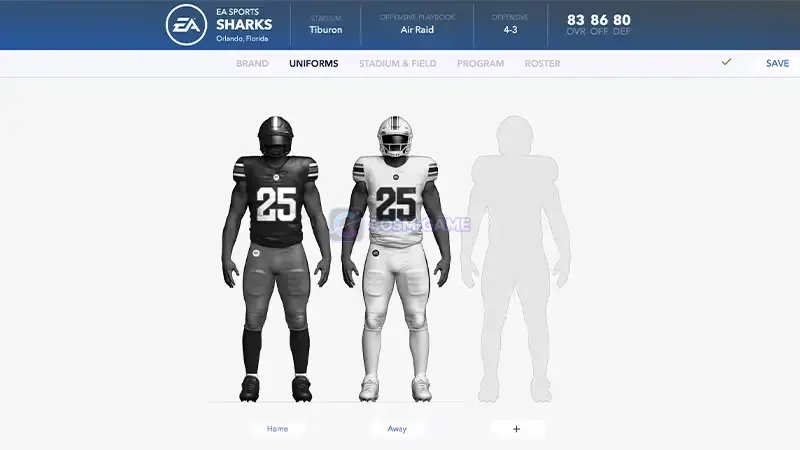
EA SPORTS College Football 27 uses the web-based Team Builder to create custom schools for Play Now, Dynasty, and Road to Glory. Sign in with your EA Account on a supported desktop browser, select Create, customize the five Team Builder sections, then save and submit the finished team.
Guide facts
On this page
You need a desktop browser and an EA Account
EA SPORTS College Football 27 custom teams are created through the web-based Team Builder, not directly from the standard in-game menus.
Before starting, make sure you have:
- An EA Account
- An internet connection
- A desktop browser on Windows or macOS
- Access to the platform or service account you use for College Football 27 when required
EA does not currently support Team Builder on phones, tablets, or devices such as Chromebooks.
Note: EA says Team Builder cannot be used while you are logged in to College Football. Leave the active game session before opening the creation website.
Create a new team on the Team Builder website
Get Started.Create to build a new school from scratch. You can also choose an existing team when you want to customize instead of starting fresh.After selecting Create, work through the five main sections: Brand, Uniforms, Stadium & Field, Program, and Roster.
Set your logos, colors and school identity in Brand
Open Brand to establish the visual identity of your custom school.
EA currently lists these Brand options:
- Logos
- Color palette
- Apparel brand
- Fonts
Team Builder lets you use premade designs or upload your own creations where the editor provides an upload option.
Uploaded content must follow EA's Rules of Conduct and User Agreement. EA can remove Team Builder content that violates those rules.
Design the home and away uniforms
Open Uniforms to create the team's game-day look.
EA lets you customize the:
- Helmet
- Jersey
- Pants
- Styles
- Textures
- Colors
Create the required home and away looks, then preview them before moving to the next part of the team.
Build the home field in Stadium & Field
Open Stadium & Field to set the venue and its game-day presentation.
The Team Builder editor includes settings for areas such as:
- Stadium name
- Capacity
- Crowd
- Atmosphere
- Stadium style and base
- End zone buildings
- Jumbotrons
- Landscapes
- Edge walls
- Goalposts
- Postseason end zones
- Stadium sounds
- Team branding around the stadium
For deeper venue editing, follow EA's official Stadium Builder guide. Under Stadium & Field > Stadium, you can choose a custom stadium or an available existing stadium depending on the setup you want.
Configure the football program and playbooks
Open Program to review the entire team and configure its football identity.
EA says this section can be used to customize player:
- Appearance
- Physical attributes
- College year
- Skill ratings
Open the Strategy menu inside the program tools to choose the team's offensive and defensive playbooks.
Finish the players in the Roster section
Open Roster to make the individual player changes you want before submitting the school.
Current Team Builder roster customization includes:
- Dealbreakers
- Ratings
- Abilities
- Appearances
- Hometowns
- Names
Review the roster carefully if you plan to use the created school for a long Dynasty or Road to Glory save.
Save and submit the finished team
Save.Submit.Submit again to confirm the team.Cancel instead and return to the editor.Once the submission finishes, the team is ready for the separate College Football 27 import process.
Your submitted team can be used in three main modes
EA currently supports imported Team Builder schools in:
- Play Now
- Dynasty
- Road to Glory
Submitting the team on the website does not by itself place it into a local game mode. You still need to download the submitted school through College Football 27 before using it in a supported mode.
If Team Builder will not open or save your team
- Make sure you are using a supported desktop browser rather than a phone or tablet.
- Confirm that the browser is running on Windows or macOS.
- Check that the EA Account sign-in completed successfully.
- Make sure you have an active internet connection.
- Exit College Football 27 if your account is still logged in to the game.
- Review uploaded logos or other custom material if the submission is rejected, because Team Builder content must follow EA's rules.
If the site continues to fail after those checks, use EA's official Team Builder support guide and continue through EA Help for the affected account.
Trailer, screenshots, and media
FAQ
8 questionsUse EA's official Team Builder website in a desktop browser. Team creation is handled on the web rather than through the normal in-game creation menus.
No. EA currently supports Team Builder on desktop browsers using traditional operating systems such as Windows and macOS. Phones, tablets, and devices such as Chromebooks are not supported.
EA requires an EA Account and an internet connection. You may also need an account for the platform or service where you play College Football 27.
EA says you cannot use Team Builder while you are logged in to College Football, so leave the game session before starting the web creation process.
Team Builder provides five main customization areas: Brand, Uniforms, Stadium & Field, Program, and Roster.
Yes. EA says Team Builder supports premade designs as well as your own uploaded creations. Uploaded content must follow EA's Rules of Conduct and User Agreement.
Yes. Stadium & Field includes stadium customization, and College Football 27 also has Stadium Builder options for structures, jumbotrons, crowd presentation, goalposts, landscapes, and other available stadium elements.
The submitted team becomes available for the separate import process. EA supports Team Builder creations in Play Now, Dynasty, and Road to Glory.