 COSM-GAME
 How to Transfer Demo Save Data on Nintendo Switch or Switch 2
Digimon Story Time Stranger can transfer the opening-chapter demo save into the full game on Nintendo Switch and Nintendo Switch 2. The demo and full game must be the same software version, and the full game should be updated before you accept the transfer prompt.
Guide facts
On this page
Keep the demo save you want to transfer
Digimon Story Time Stranger supports carrying the demo's opening-chapter save data into the full game on Nintendo Switch and Nintendo Switch 2.
Keep the demo save on your system until the transfer has finished successfully. Nintendo specifically warns players not to delete the demo data when another transfer attempt may still be needed.
Note: Progress from Central Town - Adventure Trial does not transfer. Only the transferable demo story data can continue into the full version. The demo and full game must be the same software version
The most important restriction is that Nintendo Switch and Nintendo Switch 2 are treated as separate game versions for demo transfer.
- Nintendo Switch demo to Nintendo Switch full version: supported
- Nintendo Switch 2 demo to Nintendo Switch 2 full version: supported
- Nintendo Switch demo to Nintendo Switch 2 full version: not supported
- Nintendo Switch 2 demo to Nintendo Switch full version: not supported
You can compare the two official listings on the Nintendo Switch product page and the Nintendo Switch 2 product page.
Update the full game before importing the demo save
Starting the full game before updating does not permanently block the transfer
If you already launched the full version without installing its latest update, Nintendo says you can still transfer the demo data after updating.
There is one important risk: if the full game already contains save data when you import the demo save, that full-version save will be overwritten by the transferred demo data.
Before approving the transfer, decide which progress you want to keep.
Selecting No dismisses the normal transfer prompt
Nintendo specifically documents the No choice on the confirmation screen. If you select No, the transfer screen will not normally be displayed again on later startups.
If you change your mind, Nintendo says another opportunity can appear if you delete the full-version save and restart the game while the demo data is still available.
Note: Deleting full-version save data is destructive. Only use this recovery route when you are certain the existing full-game progress is not the data you want to keep.
Nintendo Switch software can move between Switch consoles without becoming the Switch 2 version
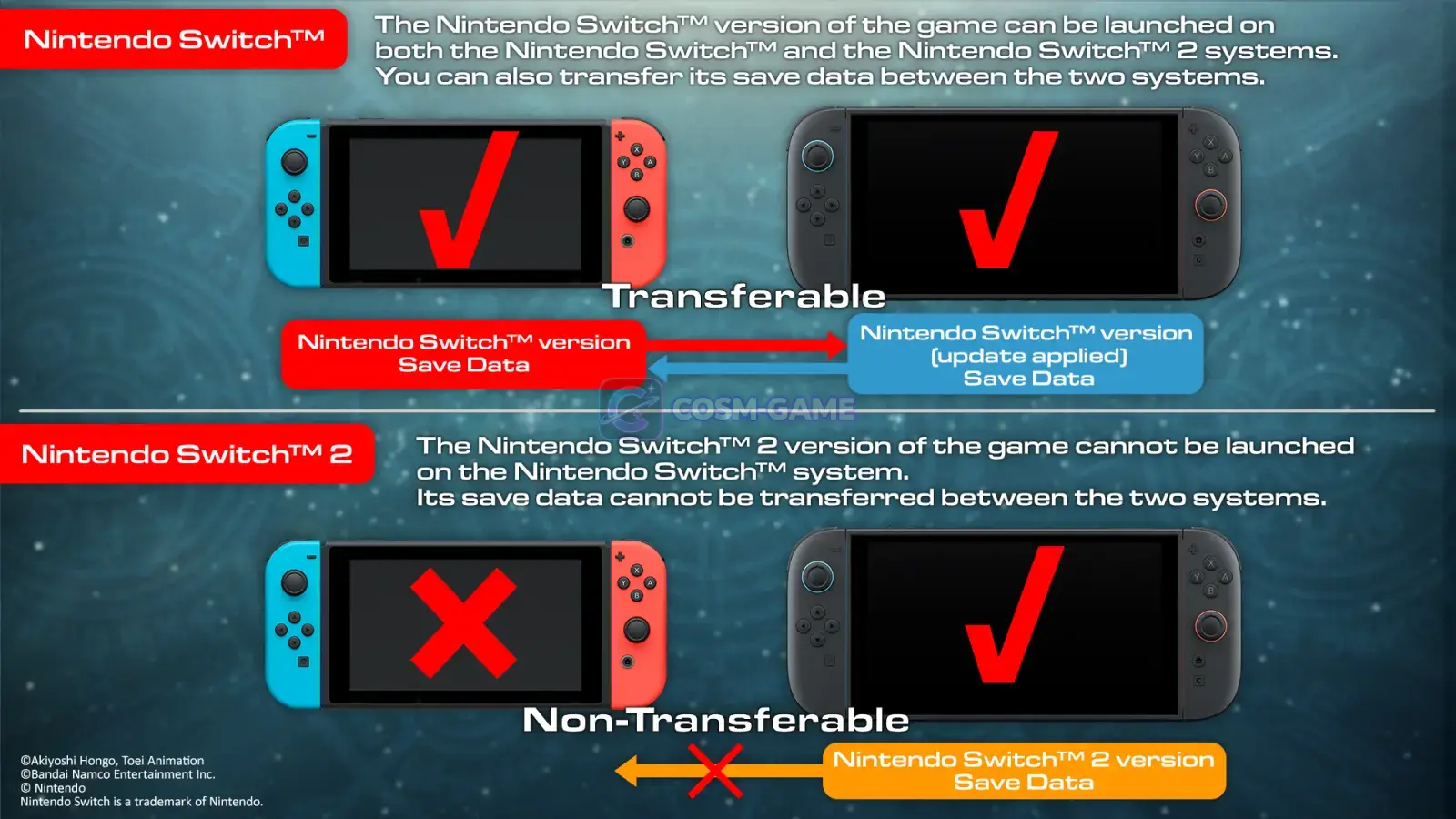
There is a separate save-data rule that can be confusing. Bandai Namco confirms that save data belonging to the Nintendo Switch version can be transferred between a Nintendo Switch console and a Nintendo Switch 2 console after the appropriate update.
That does not convert the save into Nintendo Switch 2 software data. The separately sold Nintendo Switch 2 version remains incompatible with Nintendo Switch version saves.
The official Nintendo Switch and Switch 2 specifications page illustrates this distinction between moving Nintendo Switch software data between consoles and trying to move it into the separate Nintendo Switch 2 software version.
If the demo transfer prompt does not appear
- Confirm that the full game has its latest update installed.
- Confirm that the demo save still exists.
- Confirm that the demo and full game are the same software version.
- Do not expect a Nintendo Switch demo save to appear inside the Nintendo Switch 2 version.
- If you previously selected
No, remember that Nintendo says the prompt normally will not appear again unless the full-version save is deleted and the game is restarted. - Do not look for Central Town - Adventure Trial progress in the full game because that portion is explicitly excluded from transfer.
Trailer, screenshots, and media
FAQ
7 questionsYes. Nintendo and Bandai Namco confirm that save data from the demo's opening chapter can transfer to the full version.
No. Nintendo states that demo data only transfers between matching software versions. Nintendo Switch demo data must go to the Nintendo Switch full version, and Nintendo Switch 2 demo data must go to the Nintendo Switch 2 full version.
Yes. Bandai Namco says Nintendo Switch version save data can be transferred between a Nintendo Switch console and a Nintendo Switch 2 console after the required update, but it remains Nintendo Switch software save data and cannot become Nintendo Switch 2 version save data.
No. The additional Central Town - Adventure Trial content unlocked after the demo's opening chapter does not transfer to the full game.
Nintendo says the demo data can still be transferred after you install the latest update, but existing full-version save data will be overwritten if you then import the demo save.
Nintendo says the confirmation screen will not normally appear again after selecting No. If you delete the full-version save and restart while keeping the demo data, the game can offer another opportunity to transfer it.
Do not delete the demo data before you are certain the transfer has worked. Nintendo specifically warns players to take care not to delete the demo data when another transfer attempt may still be needed.