 COSM-GAME
 How to Transfer Pokémon from Pokémon HOME to Pokémon Champions
Pokémon Champions lets you bring eligible Pokémon from Pokémon HOME into the game as visiting Pokémon. The transfer starts in Pokémon HOME, requires the same Nintendo Account to be linked to Pokémon Champions, and finishes by collecting the Pokémon from the Recruit menu in Pokémon Champions.
Guide facts
On this page
Pokémon from HOME visit Pokémon Champions
Pokémon Champions uses a visiting system for Pokémon brought in from Pokémon HOME. Instead of permanently moving the Pokémon into Champions, you send an eligible Pokémon to visit the game and then collect it through the Recruit menu.
You can later send that visiting Pokémon back to Pokémon HOME and bring it to Pokémon Champions again.
Important: Only Pokémon that appear in Pokémon Champions are eligible to visit. Pokémon recruited or otherwise obtained inside Pokémon Champions cannot be deposited into Pokémon HOME.
Use the same Nintendo Account for Pokémon HOME and Pokémon Champions
Before sending anything, check the Nintendo Account connected to both services. Pokémon Champions must use the same Nintendo Account that is registered to the Pokémon HOME account containing your Pokémon.
If you started Pokémon Champions on Nintendo Switch or Nintendo Switch 2, use the Nintendo Account linked to that console user. If you started on mobile, link the Nintendo Account you use for Pokémon HOME to your Pokémon Champions game account.
Important: Pokémon Champions Support states that a Nintendo Account cannot be unlinked or changed after it has been linked. It also says the game does not let you check which Nintendo Account was linked after setup, so confirm the account carefully before approving the connection.
Send Pokémon from Pokémon HOME on Nintendo Switch
Nintendo provides the complete console transfer process in its official Pokémon HOME transfer guide.
Pokémon Champions.Yes only after checking that it is the correct account.Yes.You can also send visitors from Pokémon HOME on mobile
The official Pokémon HOME compatibility page lists sending Pokémon to visit Pokémon Champions as available through both the Nintendo Switch and mobile versions of Pokémon HOME.
Options.Send for a Visit.Send for a Visit.The mobile version can therefore prepare visitors without requiring you to open Pokémon HOME on a Nintendo Switch. The Pokémon must still be collected inside Pokémon Champions afterward.
Collect the Pokémon inside Pokémon Champions
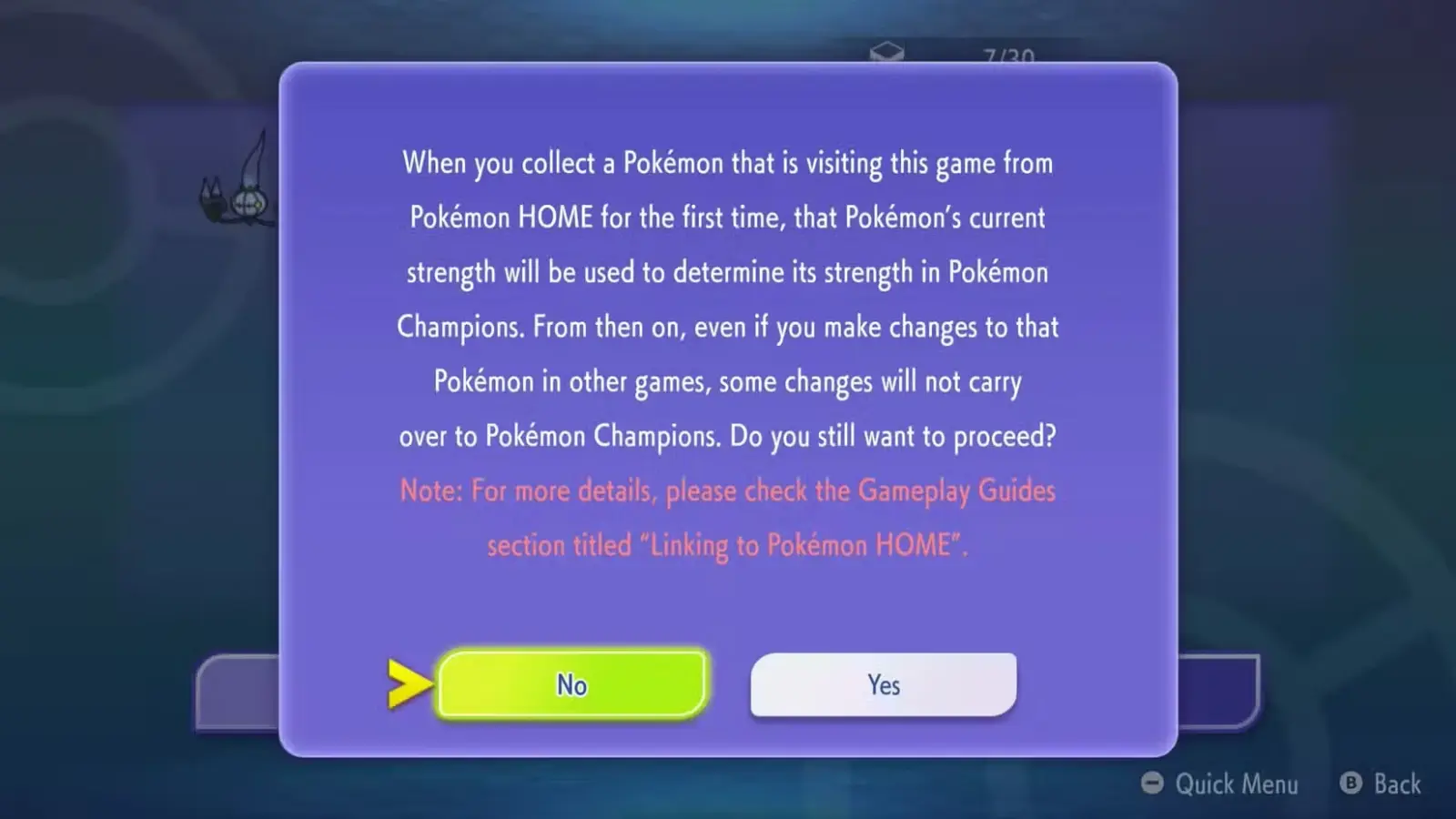
Sending the Pokémon from HOME does not finish the process. Open Pokémon Champions and collect the pending visitors.
Recruit.Collect from Pokémon HOME.Collect from Pokémon HOME again.Yes if a first-time confirmation appears.OK.Only supported Pokémon can visit
The official Pokémon Champions roster information states that only Pokémon that appear in Pokémon Champions can visit from Pokémon HOME.
This restriction applies even if the Pokémon is already stored successfully in HOME. Pokémon HOME supports many games and species, but Pokémon Champions accepts only Pokémon included in its own available roster.
Unsupported moves must be changed in training
A visiting Pokémon can arrive with moves that cannot be used in Pokémon Champions. If that happens, the official Pokémon Champions site says you must replace those moves through the game's training system before using them as required.
This does not prevent the Pokémon from returning to Pokémon HOME later.
Training in Pokémon Champions stays separate from HOME
Changes made through Pokémon Champions training do not overwrite the Pokémon's data in Pokémon HOME. When you send the Pokémon back to HOME, the Champions-specific training does not carry over into HOME.
Pokémon Champions remembers that training for a future visit, however. If the same Pokémon is sent back to Champions later, its previous Champions training is restored.
Note: If the Pokémon returns to Pokémon Champions in a different form, the official site states that its previous Pokémon Champions training results are lost.
Send a visiting Pokémon back to Pokémon HOME
You can return a Pokémon that originally came from HOME whenever you no longer want it visiting Pokémon Champions.
Recruit.Send Back to Pokémon HOME.X Button on Nintendo Switch or Nintendo Switch 2.Yes.OK to finish.Pokémon Champions Support confirms that Pokémon originally sent from HOME can return to HOME and can later be sent to visit Pokémon Champions again.
If you cannot transfer a Pokémon
- Check the Nintendo Account. Pokémon Champions and Pokémon HOME must use the same Nintendo Account.
- Check Pokémon eligibility. Only Pokémon that currently appear in Pokémon Champions can visit.
- Complete both halves of the transfer. Sending a visitor in Pokémon HOME does not place it directly into your Champions roster. You must still use
Recruit>Collect from Pokémon HOME. - Check for pending Pokémon. Open
Collect from Pokémon HOMEin Champions if a Pokémon was already sent but does not appear in your normal roster. - Do not try to export a Pokémon recruited in Champions. Pokémon obtained inside Pokémon Champions cannot be deposited into Pokémon HOME.
If a returned Pokémon seems missing in Pokémon HOME
A battle name assigned in Pokémon Champions does not replace the Pokémon's nickname in Pokémon HOME. If you returned a visitor but cannot find it, Pokémon Champions Support recommends searching HOME using the Pokémon's original nickname from before it visited Pokémon Champions.
Trailer, screenshots, and media
FAQ
6 questionsNo. Only Pokémon that appear in Pokémon Champions can visit from Pokémon HOME. An unsupported Pokémon cannot be sent into the game.
Yes. Pokémon Champions Support states that the Nintendo Account linked to Pokémon Champions must be the same Nintendo Account registered to Pokémon HOME. Check carefully before linking because the linked Nintendo Account cannot later be unlinked or changed.
Yes. Pokémon HOME supports sending Pokémon to visit Pokémon Champions from both its Nintendo Switch and mobile versions. On mobile, use the Pokémon Champions connection option in Options and choose Send for a Visit.
Yes. Pokémon that originally came from Pokémon HOME can be sent back and may visit Pokémon Champions again later.
No. Pokémon obtained or recruited within Pokémon Champions cannot be sent to Pokémon HOME. Only Pokémon that arrived from HOME as visitors can return there.
Training performed in Pokémon Champions does not change the Pokémon's data when it returns to Pokémon HOME. If the same Pokémon visits Pokémon Champions again, its Champions training is remembered, but that saved training is lost if the Pokémon returns in a different form.